


Privacy first
Your data belongs to you.

Offline mode
Use it even without connection. 1

Free to use
No payments. No monthly subscription.
Add your first note
End each day with a chance to reflect back on it.
Simply add new accomplishments in short sentences or tags.
Autcomplete suggestions help you based on your previous notes.
Made a wrong note? Just swipe it away.
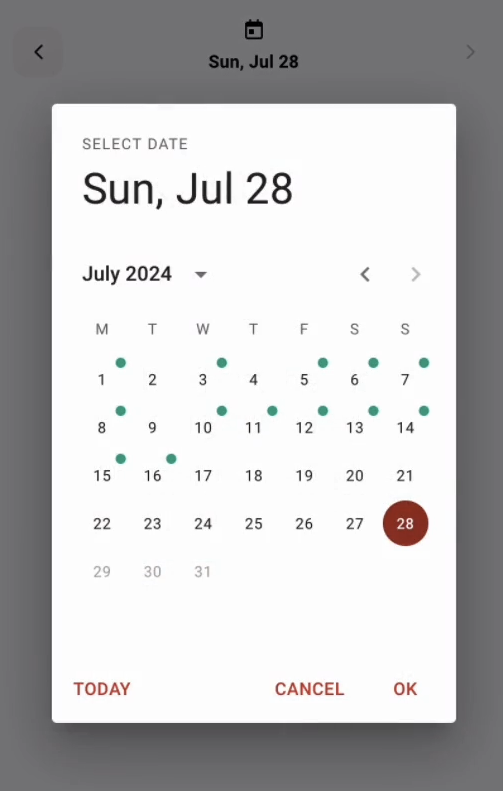
Check-in on your progress
View the green dots on the calendar to get a quick monthly overview and easily check on which days you tracked accomplishments.
Forgot to write a record for today? Go back and just add it later.
All your feats at a glance
An overview of all your tags allows deep reflection on everything you achieved since you started tracking your accomplishments.
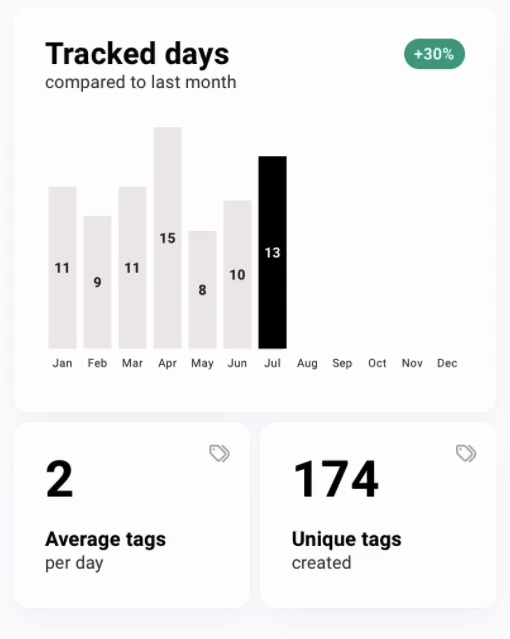
Analyze your accomplishments
In-depth stats allow for insights into:
- Tracked days
- Comparison to previous months
- Average tags per day
- Unique tags
What now?
Help yourself remember the positive.

About deedfeat
Let’s face it. Our memories suck and while it’s easy to remember the bad, we often struggle in keeping the positive in our minds.
I’ve built this Web-App to aid myself in the process of reflecting on small accomplishments I would’ve just forgotten about otherwise. Unlike a fully fledged journal, this is aimed at people who prefer an effortless way to add a few tags or short sentences each day and check back after a week or month at most. Quick anchors for your mind to remember “Oh true, I did that!”, feel better and keep on going with a cheerful mood.
Read more about the origins in my article:
“The benefits of starting an achievement log“
FAQ
Why should I use this instead of XYZ?
You don’t. Try it out and if you don’t vibe with it, find something that does work for you.
How can I add this to my Home Screen like an actual App?
on iOS:
- Step 1: Open https://www.deedfeat.com/app in Safari
- Step 2: Tap the share symbol
- Step 3: Select “Add to Home Screen” and click “Add”
on Android:
- Step 1: Open https://www.deedfeat.com/app in Chrome
- Step 2: Tap the three dot symbol
- Step 3: Select “Add to Home Screen” and click “Add”
Please note: Due to the way Local Storage stores data, the data in your browser will be different from the data in the Home Screen Web-App.
Where is my data stored?
Your data is stored locally and separate for each browser on your own device using Local Storage.
Can you backup or restore my data?
No, I have no access to your data.
Do I need to be online to use this Web-App?
No, if you’ve added the Web-App to your Home Screen, the core features of the Web-App work totally fine.
Please note: During offline mode you won’t be able to check for updates.
Do you track my usage?
No. There are no trackers embedded into the Web-App. For more in-depth information take a look at the Privacy Policy.
- Offline mode requires the Web-App to be installed as a PWA (Progressive Web-App) via “Add to Home Screen” ↩︎